
AI narration
Narrated videos, without recording a thing.
From your slides and script, we create an explainer video with natural Japanese AI narration. Choose from 30 voices, and never redo a take because of a slip. Edit the text and the voice is regenerated to match.
The Free plan starts with just a sign-up (documents up to 10 pages, videos up to 3 minutes, subtitles and translation in Japanese and English).
Sound familiar?
- Recording your own voice takes time, and you end up doing take after take
- Hiring a narrator means extra cost and scheduling
- Machine voiceover sounds unnatural — reading 「千円」 as "one zero zero zero yen," for example
With mind2D.ai
30 voices
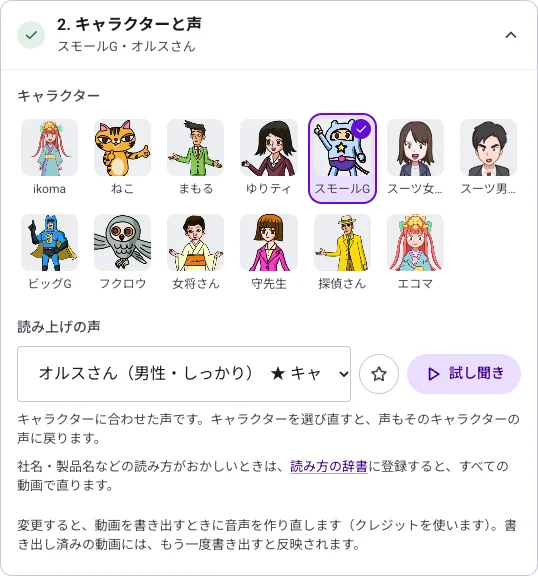
Calm, bright and more — pick the one that fits your content. A single video uses one consistent voice.
Japanese that reads naturally
Numbers, amounts and dates are read the Japanese way, and you can register company and product name pronunciations in your organization's dictionary.
Subtitles at the same time
The same text that is narrated is shown as subtitles.
Edit the text, fix the voice
Edit a line in the script and export again — the audio for that line is regenerated.
Just 3 steps
- STEP 1
Upload your slides
Add a PowerPoint or PDF, and AI writes the script.
- STEP 2
Choose a voice
Preview the voices, pick one, and fine-tune the pronunciation.
- STEP 3
Export the video
Export as an MP4 with narration and subtitles.
Frequently asked questions
What if a word is read incorrectly?
Register the word and its reading in your organization's pronunciation dictionary, and it will be used from then on.
Can I create narration in English too?
Yes. 12 languages are supported (the Free plan covers Japanese and English).
Can it be viewed on a smartphone?
The exported MP4 plays on smartphones and tablets. With subtitles included, the message still gets across where sound can't be played.
Can I write the script myself?
Yes. If your PowerPoint speaker notes already contain the script, they can be narrated as they are.